Writing SQL for Macola® Progression
The two parts of Writing your own SQL reports that apply only to a Macola® Progression database: dates stored as numbers, and text columns padded with spaces. Both bite the first time you write your own SQL against Progression.
If you are on Macola® ES or Macola 10, you can skip this page. Everything here is about reading Macola® Progression tables directly — in a Query Analyzer report, in the Advanced Query Analyzer, or in a stored procedure one of them calls.
Dates are stored as numbers
Progression stores nearly every date as a number. The column is an int holding
the date as yyyymmdd, so July 22, 2021 is stored as 20210722, and "no date"
is stored as 0. Macola® ES stores the same fields as datetime.
Select ord_dt straight from a Progression table and the grid shows 20210722.
It sorts plausibly enough, which is what makes the problem easy to miss, but the
column formats as a number, the grid's date filters never appear, and every
dateless row sorts to the top as a zero. One expression in the query fixes all
three:
select ord_no, cast(rtrim(nullif(ord_dt, 0)) as date) as [Test Date]
from oeordhdr_sql
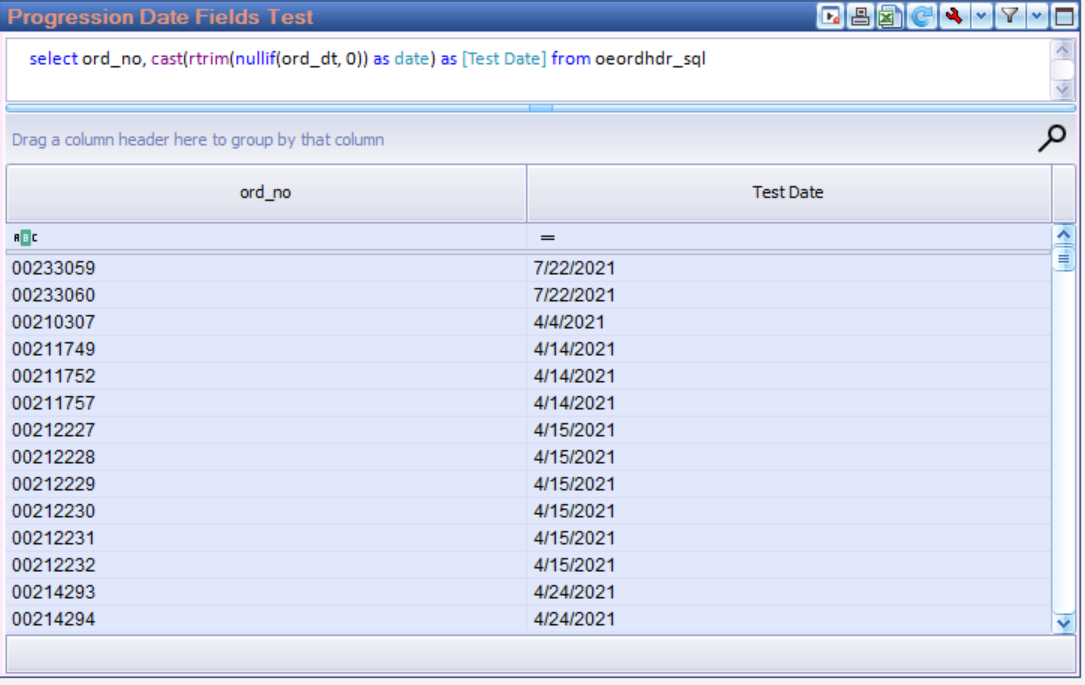
ord_dt cast to a real date. The column now formats, sorts and filters as one.Reading that expression from the inside out:
nullif(ord_dt, 0)turns Progression's0into NULL, which is what "no date" actually means. Leave it out and every dateless row either fails the conversion or lands on a nonsense date.rtrim(...)converts the number to text. It is the shortest way to write it;convert(varchar(8), ord_dt)says the same thing at greater length.cast(... as date)converts the eight-digit text to a real date. SQL Server reads theyyyymmddform unambiguously, so no style code is needed.
Once the column is a real date the grid treats it as one, and the date filters
and their operators in the main
guide all apply. Is null is then how you find the rows Macola® stored as 0,
which is usually the fastest way to spot orders that never had a date keyed at
all.
When a column holds bad dates as well as zeros
Some columns carry the occasional bad value alongside the zeros, and a hand-keyed
20219999 does happen. Use try_convert in place of cast and those values
come through blank instead of stopping the query:
try_convert(date, rtrim(nullif(ord_dt, 0)))
Convert for display, compare as stored
The WHERE clause is a different matter. Comparing the stored number against a
yyyymmdd literal is both correct and fast, so where ord_dt >= 20210101 needs
no conversion at all. It also leaves SQL Server free to use an index on the
column, which wrapping that column in cast would not. Convert for display;
compare as stored.
Text columns are padded
Almost every text column in Progression is char, so its values carry trailing
spaces. Where a join or a comparison puts a padded column against a trimmed
value, wrap the column in RTRIM():
from oeordhdr_sql h
join arcusfil_sql c on rtrim(c.cus_no) = rtrim(h.cus_no)
A padding mismatch returns no rows and no error
Nothing on screen tells you the join failed on trailing spaces. The report simply comes back empty, or short by exactly the rows you were looking for, which is the hardest sort of problem to spot.
Where to go next
- Writing your own SQL reports — the Query Analyzer from start to finish: the editor, the optimized tables, date filters, formatting, stored procedures and Pulse filters
- Optimized tables — what Pulse Dashboard has already built for its own reports, and the first place to look before any raw Macola® file
- Everyday tips — format codes, tab colors and the right-click habits
Need a hand?
The PULSE support team is happy to help — call (513) 723-8095 or email [email protected]. Send us the query you are working on and we will look at it with you.