Customer Service & Shipping Module
Keeps every unshipped order in view — on-time shipping performance, shipping shortages, credit-memo patterns, and order entry without leaving a report.
What it does
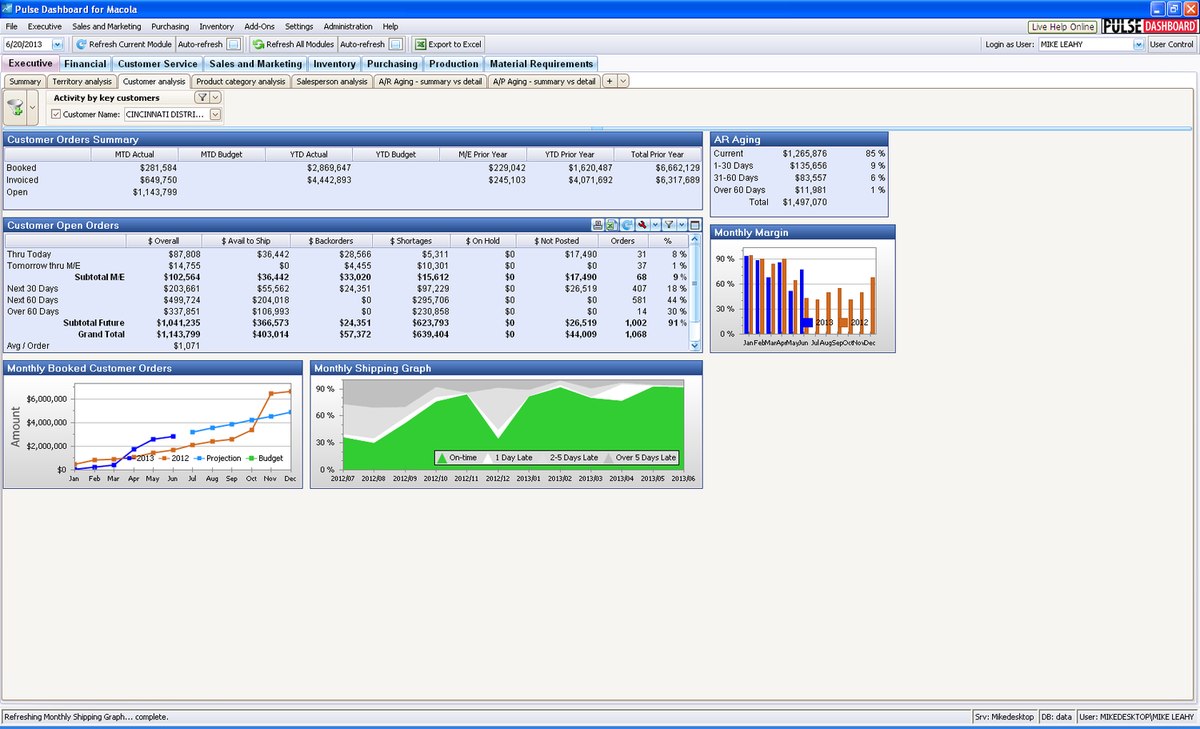
The Customer Service & Shipping module focuses the team on unshipped orders: an on-time shipping graph, a screen that pinpoints finished-good items causing shortages, and credit-memo tracking that surfaces recurring problems before they cost you a customer.
Capabilities
- On-time shipping graph, with daily or monthly views
- Finished Good Items Causing Shortages — customer orders that cannot ship on time, based on the due dates of customer orders, production orders and purchase orders
- Top credit-memo customers and items, with drill-down to the details
- Customer Order Dynamic View — detailed unshipped/invoiced reporting by item, customer, product category, salesperson or period
- Fill-rate tracking, with the cut-off date based on the order line request date (promise date and header ship date options available)
- Create Macola® orders directly from any report
Highlights
An "MRP system" just for shipping
The shipping-shortages screen answers one question precisely: of the items scheduled to ship over the next X days, which ones won't have enough quantity? It nets customer-order due dates against supporting production orders, purchase orders and forecast. Drilling into an item shows a time-phased list of the customer orders and their replenishments — an effective way to work customer-order shortages before they become missed promises.
Credit memos tell a story
Credit memos can mean the customer orders the wrong product, the wrong product ships, or product is damaged in transit — the module ranks credit memos by customer and by item so the pattern is visible, with full drill-down to the underlying documents.
Enter orders right from a report
Right-click any item or customer number on any report to open the Macola® processes menu: authorized users can create an OE customer order (or a purchase order or POP production order) on the spot — enter customer, item, quantity and price, save, and the order lands in Macola® like any other.
Adapted from the official Customer Service & Shipping fact sheet (PDF, August 2023).
Need a hand?
The PULSE support team is happy to help — call (513) 723-8095 or email [email protected].