Serial / Lot Traceability and Recall Tracking
Adapted from How to use PULSE Dashboard for Serial / Lot Traceability and Recall Tracking in Macola® on leahyconsulting.com.
The Serial/Lot Trace View, part of the Pulse Dashboard Inventory module, gives you one screen to research lot or serial number activity across every kind of transaction — created especially for Macola® users in food and other regulated businesses, and a strong aid for ISO-compliance tracking.
How it works
- Key in all or part of a finished-good or component item number, and/or a serial or lot number.
- Press the Find button.
The program instantly pinpoints the activity of the parent item or component and presents it on separate tabs:
- On-hand quantities
- Purchase-order receipt quantities and dates
- Production orders that consumed the component
- Pending customer orders and invoiced customer shipments
- Parent serial/lot numbers with their component serial/lot numbers
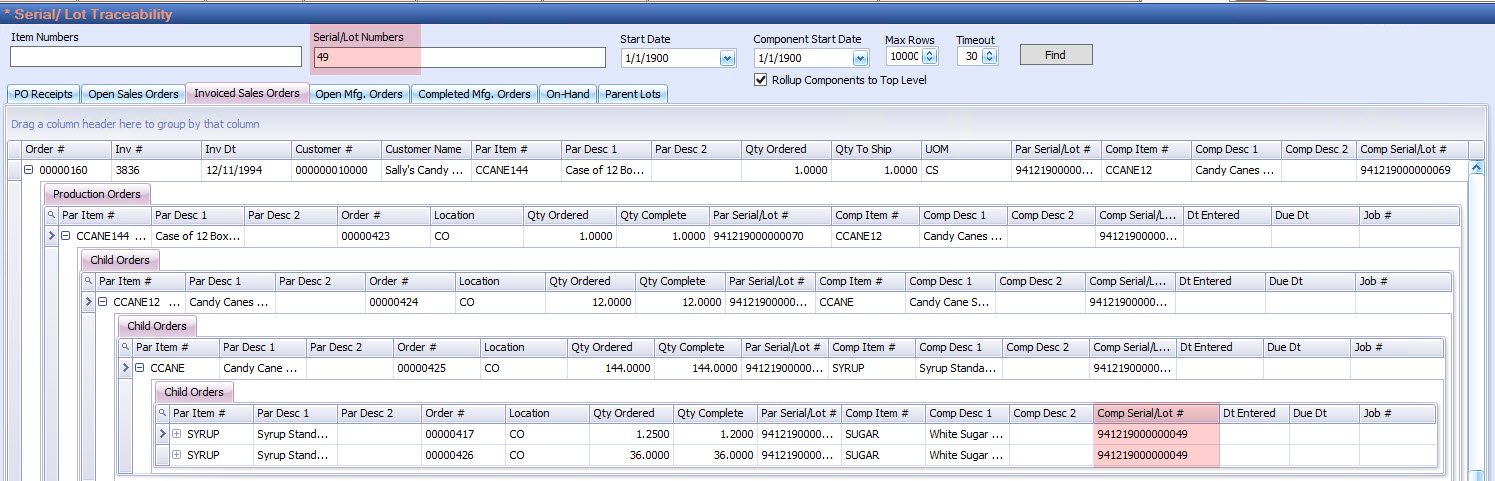
Standard Pulse filtering and sorting narrows the results to the date ranges you care about, and every screen can be exported to Excel or PDF, printed, or emailed — which is exactly what you want in a recall drill.
Tip
Availability. Lot & Serial Number Traceability / Recall Tracking is an enhanced module of the Pulse Dashboard suite. Contact sales at (513) 723-8091 for licensing details.
Tip
Need a hand? The PULSE support team is happy to help — call (513) 723-8095 or email [email protected].