Sales & Marketing Module
Track sales by any metric, against budgets you actually control — with drill-down from the big picture to the individual order.
What it does
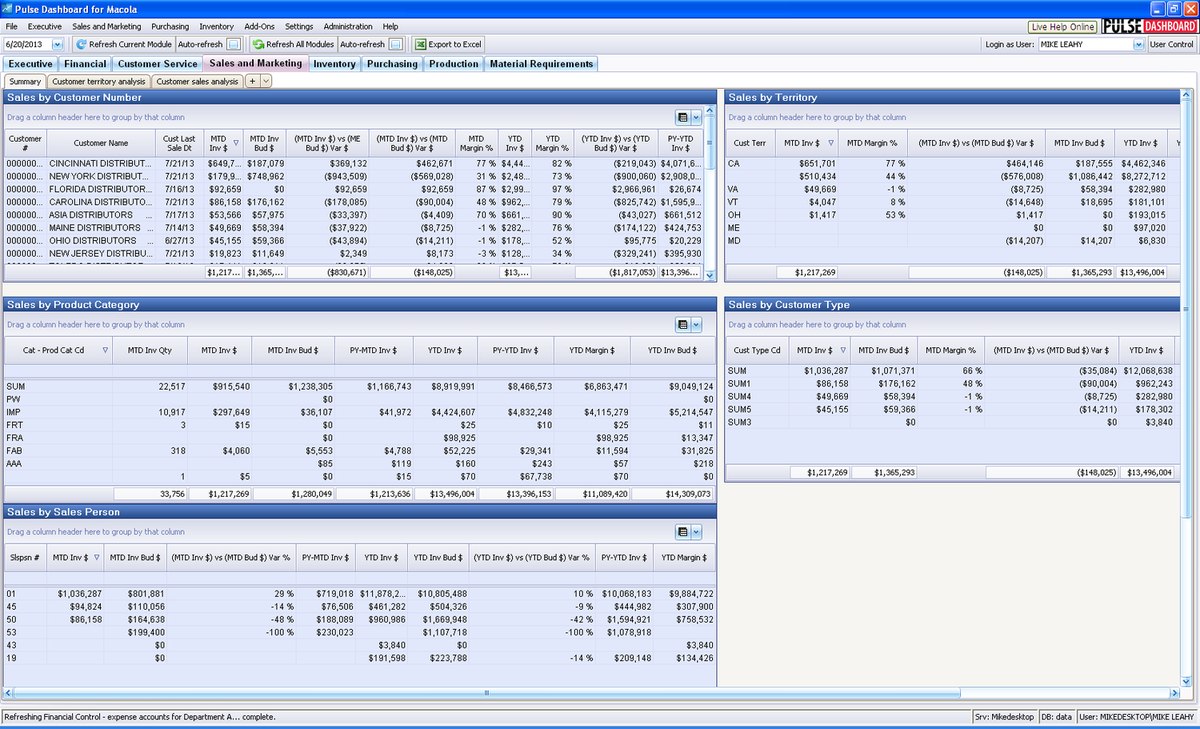
The Sales & Marketing module tracks sales by any metric — customer, customer type, item, product category, product line, salesperson, outside distributor, territory, even user-defined fields — and lets you assign a forecast or budget to any metric you track. Sales vs. forecast is available for MTD, QTD, YTD and prior year, in dollars or percentages, with drill-down from any figure to the open, booked or invoiced orders behind it.
Capabilities
- Track sales by any metric, with budgets assignable to each
- Sales vs. forecast for MTD, QTD, YTD and prior year — dollars or percentages
- Create or adjust sales budgets at any time; multiple budgets per year
- Drill down from any metric to open customer orders, booked orders or invoiced orders
- Column Chooser: over 600 Macola® columns plus over 600 calculated variance columns (quantity or value, current vs. last year, by month/quarter/year)
- Sort and filter on any column; tab filters create instant lookups across customers, items, salespeople, product categories and user-defined fields
- Export anything on screen to Excel or PDF, print it, or email it
Highlights
Analysis that answers real questions
Which product categories contribute the highest gross margin? Sort the sales analysis by YTD dollars by product category and the answer is on screen — then copy the report and re-column it by customer, salesperson or territory in seconds.
Budgets most ERP systems can't do
Pulse Dashboard includes a powerful budgeting screen most ERP systems lack: build a budget from last year's actuals adjusted by a percentage, import it from an Excel template the software generates, or key it manually. Budgets are entered by month at any of seven levels (customer, salesperson, item, and combinations), each month expressed as dollars, units, average selling price or margin — and up to two budgets can be assigned to each sales analysis report as comparatives. The full walk-through is in Setting up budgets.
Adapted from the official Sales & Marketing Module brochure (PDF) on leahyconsulting.com.
Need a hand?
The PULSE support team is happy to help — call (513) 723-8095 or email [email protected].